Car radio static usually comes from weak reception, a damaged antenna, loose wiring, electrical interference, or a faulty radio.
If your car radio crackles during a drive across the United States, the cause may be as simple as a weak station signal or as complex as an electrical fault. Tall buildings, hills, tunnels, and long rural highways can all affect AM and FM reception. Before buying a new stereo, check whether the noise affects one station, every station, or other audio sources.
The best way to fix car radio static is to narrow down the cause before replacing parts. Test AM and FM stations, compare the sound with Bluetooth or another audio source, inspect the antenna, and listen for changes when the engine starts. These simple checks can help you decide whether the problem is related to reception, wiring, interference, or the radio itself.
Car radio static occurs when unwanted noise interferes with the audio signal or when the radio cannot receive a clean broadcast. The noise may sound like hissing, crackling, popping, buzzing, or a rough scratching sound. Each type can offer a clue, but the sound alone cannot confirm the cause.
A radio receives signals through its antenna and converts them into sound through its internal electronics and speakers. If the incoming signal is weak, interference is strong, or a connection is faulty, the result may be noisy audio. A problem in the radio, amplifier, speaker wiring, or power supply can also create similar symptoms.
Start by checking when the static occurs. If it happens only on one station, reception may be the issue. If every station is noisy but Bluetooth sounds clear, focus on the antenna and radio reception path. If every audio source crackles, check the amplifier, speakers, power supply, and related connections.
Source: carxplorer.com
Weak radio signal
The station may be too far away, blocked by terrain, or affected by nearby structures. Try another station or move to a more open area.
Antenna or cable fault
A loose antenna, damaged mast, corroded connector, or faulty antenna cable can reduce signal strength.
Electrical interference
Ignition components, charging equipment, aftermarket electronics, or poor grounding may introduce unwanted noise.
Radio or audio system fault
Internal radio damage, amplifier problems, or speaker wiring faults may cause noise across multiple stations or audio sources.
What Does Different Radio Static Sound Like?
Hissing often points to weak reception or background electronic noise. Sharp pops and clicks may be linked to intermittent connections or electrical interference. A steady buzz may suggest a grounding or power-related issue, although these patterns are clues rather than definitive diagnoses.
Listen for when the noise begins and ends. Does it occur only while driving, only with the engine running, or even with the ignition on and the engine off? These details can help separate broadcast problems from noise generated by the vehicle.
Hissing between stations
Some hiss is normal when tuning between stations, but strong noise on several local stations may indicate poor reception or an antenna problem.
Crackling over bumps
A noise that changes when the car moves over bumps may indicate a loose connection, damaged cable, or another vibration-sensitive fault.
Buzzing with the engine running
Compare the sound with the engine off. If the noise appears only while the engine runs, investigate charging-system interference and grounding.
Step 1: Check Whether the Problem Is the Radio Signal
Begin with the simplest test: tune to several known stations and see whether the static affects all of them. Choose a strong local FM station, another FM station, and an AM station if your vehicle supports AM radio. Do this while parked in a safe location.
If only one station sounds noisy, the station’s signal, broadcast conditions, or coverage may be responsible. If many stations sound poor, the antenna or radio reception system becomes a stronger suspect. A single test cannot rule out every possibility, but comparing stations helps narrow the search.
Next, repeat the test in a different location. In the United States, reception can vary between dense city streets, underground parking garages, mountain roads, and open rural areas. If reception improves after leaving a building or moving away from hills, weak signal strength or local obstruction may explain the problem.
Source: improvecaraudio.com
Test several stations
Compare stations with different signal strengths. If one station is noisy while others sound clear, avoid assuming the stereo is defective.
Move to an open area
Check reception away from garages, tunnels, large buildings, and other locations that may block or weaken signals.
Compare AM and FM
AM and FM respond differently to interference and propagation conditions. Poor reception on both bands may suggest a shared antenna or receiver issue, although separate faults remain possible.
Check another day or time
Temporary interference or changing broadcast conditions may affect reception. If the issue comes and goes, note the circumstances before replacing hardware.
Why AM Radio May Have More Static Than FM
AM radio can be especially sensitive to electrical noise from nearby devices and vehicle systems. Its reception can also change with distance, terrain, and atmospheric conditions. A station that sounds clear in one location may become noisy farther away.
FM reception can also weaken when hills, buildings, or distance obstruct the signal. Multipath interference can occur when radio waves reach the antenna along different paths, sometimes causing distortion or fluctuations. These effects do not automatically mean the car radio needs repair.
If AM is noisy but FM is clear
Look for AM-specific interference, weak AM signals, or a reception issue that affects that band more strongly.
If AM and FM are both noisy
Inspect the antenna, antenna cable, connectors, and shared receiver components.
Step 2: Inspect the Car Radio Antenna
A damaged or poorly connected antenna is one of the first hardware issues to check when several radio stations sound weak. The antenna captures broadcast signals and sends them to the receiver. If the antenna or its cable is damaged, the radio may struggle to pick up stations even when the stereo otherwise works normally.
Park the vehicle and turn the radio off before inspecting the antenna. Look for a bent, cracked, loose, or missing external antenna mast. If your car has a roof-mounted antenna, check for visible damage and confirm that the base does not appear loose.
Some vehicles use a short roof antenna, a concealed antenna, a windshield antenna, or an antenna integrated into the glass. These designs may not have an obvious removable mast. Do not pull at windshield antenna elements or pry apart trim to reach a hidden component.
Source: hitchesguide.com
Check the antenna mast
Look for physical damage, corrosion, or a loose mounting point. Replace a damaged mast with a compatible part if the design allows safe replacement.
Inspect accessible connectors
If the antenna connection is designed to be user-accessible, check that it is secure. Do not force a connector or disassemble dashboard trim without the proper procedure.
Look for water intrusion
Moisture around an antenna base or nearby trim may contribute to corrosion or connection faults. Persistent leaks need to be repaired rather than covered up.
Check aftermarket antennas
Confirm that an added antenna is compatible with the radio and is installed according to its instructions.
How to Tell If the Antenna Is Causing Static
Antenna problems often cause weak reception across multiple stations while Bluetooth or USB audio remains clear. Another clue is a noticeable loss of reception after the antenna is removed, damaged, or replaced. However, a receiver fault can produce similar symptoms, so these signs are not conclusive.
If the antenna looks intact but reception remains poor, the coaxial cable or connector may be faulty. A coaxial cable carries the radio-frequency signal from the antenna to the receiver. Internal cable damage or a poor connection can weaken the signal without producing an obvious external defect.
Reception became poor after bodywork
Ask whether the antenna, roof trim, windshield, or associated wiring was disturbed during the repair.
Static began after a stereo installation
Check whether the antenna lead was connected correctly and whether any required antenna adapter or powered antenna supply was installed.
Step 3: Find Electrical Interference From the Engine
If radio static appears when you start the engine or changes with engine speed, investigate electrical interference. The vehicle’s ignition and charging systems can produce electrical noise that reaches the radio through the air or through shared power and ground paths. A poor connection can make that noise more noticeable.
First, park outdoors in a safe place. With the vehicle stationary, compare the radio with the ignition on and the engine off, then with the engine running if it is safe to do so. Follow the owner’s manual for the correct operating procedure, and never perform this test in an enclosed garage because exhaust gases can be deadly.
If the noise begins with the engine running, note whether it rises or falls as engine speed changes. That pattern can support an electrical-interference diagnosis, but it does not identify a specific faulty part. A technician may need to inspect charging-system operation, grounds, ignition components, and radio power connections.
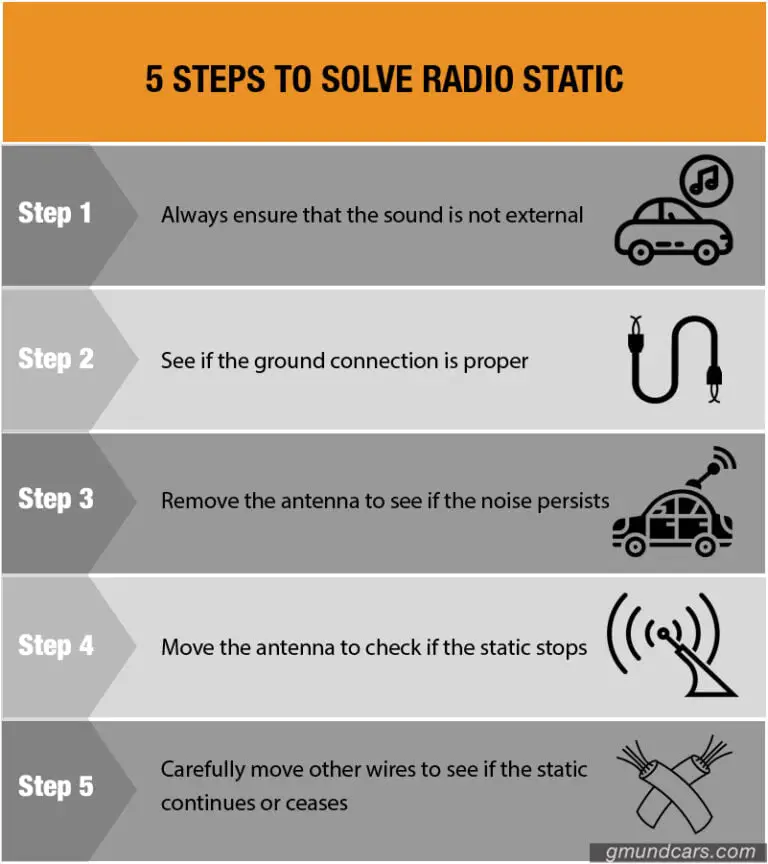
Source: gmundcars.com
Ignition-system noise
Faulty or poorly suppressed ignition components may create interference that is audible through the radio, particularly on AM.
Charging-system interference
Alternator-related electrical noise may enter the audio system through wiring or grounding paths. Testing is needed before replacing the alternator.
Poor ground connection
A loose, corroded, or damaged ground may increase noise or cause other electrical symptoms.
Aftermarket equipment
Phone chargers, USB adapters, dash cameras, LED accessories, and other added devices may introduce interference.
How to Check for Interference From Accessories
Disconnect one nonessential accessory at a time, starting with plug-in chargers or USB adapters. Turn the radio back on and see whether the static changes. If removing one device stops the noise, reconnect it once to confirm the result before deciding what to change.
Do not disconnect essential vehicle equipment or unplug wiring behind the dashboard as part of this simple test. If the noise continues with accessories removed, the source may be part of the vehicle’s electrical system or audio installation.
Noise starts when charging a phone
Try a known-compatible charger or a different power outlet, provided the vehicle has one. A faulty or poorly filtered charger may be responsible.
Noise starts after adding LED lights
The lighting driver or its wiring may create interference. Have the installation checked if the noise remains after basic tests.
Noise remains with accessories removed
Record whether it changes with engine speed and arrange a charging-system and ground inspection if needed.
Step 4: Test Bluetooth, USB, and Other Audio Sources
Testing another audio source is one of the fastest ways to separate radio reception problems from broader audio faults. Play music through Bluetooth or USB if your vehicle supports it. You can also test a built-in media player or another source specified in the owner’s manual.
If Bluetooth sounds clean but AM and FM remain noisy, the speakers and at least part of the audio system are likely working. Focus next on the antenna, receiver, radio-frequency connections, and interference affecting broadcast reception. This does not completely rule out a fault inside the radio because different inputs may use different internal circuits.
If every source crackles, pops, or cuts out, look beyond the broadcast signal. The problem may involve speaker wiring, an amplifier, the radio’s power supply, or a loose connection. If the sound distorts only at high volume, the speakers or amplifier may be struggling, or the audio signal may be clipping.
Source: carstereowiki.com
Radio static but Bluetooth is clear
Prioritize the antenna system, radio reception, station signal, and sources of radio-frequency interference.
Static across all sources
Investigate audio wiring, amplifier operation, power and ground connections, and possible speaker faults.
One speaker crackles
A damaged speaker, loose speaker wire, or channel-specific amplifier fault may be involved.
Sound cuts out when volume rises
Check for distortion, overheating, loose connections, or a speaker or amplifier problem rather than assuming poor radio reception.
Check Whether the Problem Is a Speaker
If your vehicle has balance and fade controls, use them to listen to each speaker separately at a moderate volume. If one speaker crackles while the others sound clear, the fault may be limited to that speaker or its wiring.
Do not remove door panels without checking the correct service procedure. Doors can contain side-impact airbag components, electrical connectors, and fragile clips. If a speaker inspection requires access near airbag wiring, use a qualified installer.
Only one speaker sounds noisy
Ask a technician to check that speaker and its wiring before replacing the entire radio.
All speakers distort together
Check the source signal, amplifier, radio output, and shared power connections.
Step 5: Inspect Radio Wiring, Connectors, and Grounding
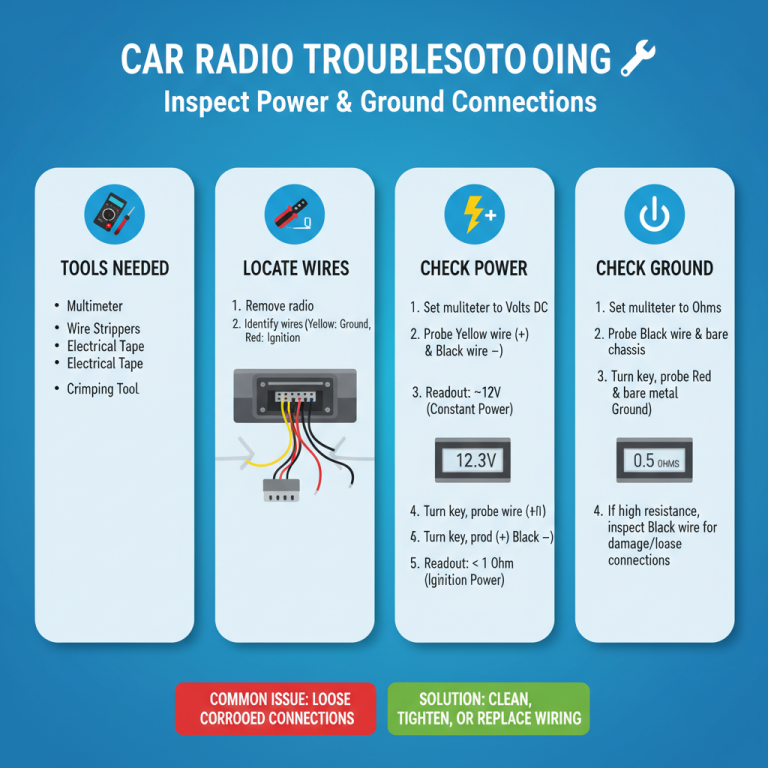
Loose or damaged wiring can cause static, intermittent sound, or a radio that works only under certain conditions. The problem may begin after a stereo replacement, dashboard repair, battery service, or installation of another electrical accessory. Even when the radio turns on normally, a poor signal connection or ground can still affect performance.
Start with visible and accessible wiring only. Look for an antenna cable that appears disconnected, damaged insulation, signs of moisture, or a plug-in accessory that is not seated properly. Do not pull wires, probe unknown connectors, or remove dashboard components without the vehicle’s service instructions.
If the radio was installed after the vehicle left the factory, check the installation documentation. Some vehicles need a compatible wiring adapter, antenna adapter, or powered antenna interface. The exact setup depends on the vehicle and stereo, so do not assume every installation uses the same connections.
Source: autostereoguide.com
Loose antenna lead
A disconnected or poorly seated radio-frequency connector may weaken reception. A qualified installer can inspect the connector and cable if access is difficult.
Poor ground
A weak ground connection may contribute to electrical noise or unstable operation. Ground points should be checked against the correct wiring diagram.
Damaged cable
Crushed, pinched, corroded, or poorly routed cables may interrupt the signal or allow interference to enter the system.
Incorrect adapter
An incompatible antenna adapter or wiring interface may prevent proper operation after an aftermarket stereo installation.
When Should You Reset the Radio?
A reset may help if the radio has frozen, behaves unpredictably, or has a software-related problem. It is less likely to fix a damaged antenna, weak broadcast signal, corroded connector, or persistent electrical interference.
Check the owner’s manual before resetting the unit. Some radios require a security code or may erase saved stations and user settings. Never disconnect the battery solely as a first step without checking the manufacturer’s procedure and the vehicle’s electrical requirements.
Try a reset when the radio behaves erratically
Use the reset method specified for the exact vehicle or head unit.
Avoid repeated resets for persistent static
If the problem remains, return to signal and wiring diagnosis instead of repeating a step that does not address the likely cause.
Step 6: Check the Fuse and Power Supply When Needed
A blown fuse or unstable power connection can cause a radio to stop working, restart, or behave erratically. However, a radio that powers on and plays normally between bursts of static does not automatically have a fuse problem. Reception and signal-path checks are usually more useful when the only symptom is noisy AM or FM audio.
If the radio loses power, reboots, or fails to turn on, consult the owner’s manual to find the correct fuse location and rating. With the vehicle safely parked and the ignition off as instructed, inspect the specified fuse if the manual permits owner inspection. Replace a blown fuse only with one of the same specified rating.
Never install a higher-rated fuse to stop it from blowing. A fuse protects a circuit against excessive current, and using an incorrect rating can create a fire risk or damage equipment. If a replacement fuse blows again, stop replacing it and have the circuit diagnosed.
Source: hitchesguide.com
Radio will not turn on
Check the documented fuse and power-supply troubleshooting steps in the owner’s manual.
Radio repeatedly restarts
A power or ground issue, battery problem, software fault, or internal radio failure may be involved.
Fuse blows repeatedly
Stop using replacement fuses to test the circuit and arrange professional electrical diagnosis.
Can a Weak Car Battery Cause Radio Noise?
A weak battery or charging-system fault can cause voltage-related symptoms, especially if the radio dims, resets, or cuts out while other electrical equipment behaves strangely. Static by itself is not enough to diagnose a weak battery.
If you also notice slow engine cranking, warning lights, or repeated electronic resets, have the battery and charging system tested. A technician can check system voltage and charging performance using the correct procedure for your vehicle.
Noise plus dimming or resets
Investigate power supply and charging-system health instead of treating the issue as an antenna problem alone.
Noise with normal radio operation
Continue testing reception and interference before assuming the battery is responsible.
Step 7: Use a Symptom Table to Narrow Down the Cause
Once you have completed the basic tests, compare your results with the table below. The aim is to identify the next useful check, not to diagnose a specific component from one symptom. Several faults can produce similar sounds, so confirm the likely cause before spending money on parts.
Source: hitchesguide.com
Static on one station only
Likely next check: compare other local stations and check whether reception improves in a different location.
Static on most AM and FM stations
Likely next check: inspect the antenna and its connections, then consider receiver or cable faults.
Static only when the engine runs
Likely next check: compare engine-off and engine-on behavior safely, then investigate electrical interference.
Static when a charger is plugged in
Likely next check: remove the charger and confirm whether the noise stops.
Static on radio and Bluetooth
Likely next check: test individual speakers and inspect the amplifier, power supply, and audio wiring.
Radio cuts out over bumps
Likely next check: have the relevant connections and wiring inspected for intermittent contact.
Radio restarts or loses power
Likely next check: consult the owner’s manual and inspect the specified fuse and power supply.
Which Repair Should You Try First?
Choose the next repair based on the test result. If removing a phone charger stops the noise, there is little reason to replace the antenna immediately. If all stations remain weak but Bluetooth is clear, investigate the antenna path before buying a new head unit.
If the evidence points to more than one possible fault, ask a qualified car audio technician to test the system. A proper diagnosis can prevent replacing a working radio when the actual problem is a cable, ground, or interference source.
Start with free checks
Test stations, change location, compare audio sources, and remove nonessential accessories one at a time.
Repair confirmed faults
Replace or repair a component only after its condition or operation has been checked.
Escalate complex electrical faults
Use a qualified technician when the problem involves hidden wiring, repeated fuse failures, charging-system diagnosis, or airbag-adjacent components.
Common Mistakes When Fixing Car Radio Static
The most common mistake is replacing the radio before testing the antenna, reception, and other audio sources. A new stereo may not solve the issue if the original fault is a damaged cable, an incompatible adapter, or electrical interference. Simple tests can help you avoid unnecessary expense.
Another mistake is assuming that all static has the same cause. Weak station reception, engine-related interference, and speaker distortion may sound similar at first, but each requires a different approach. A useful diagnosis depends on when the sound occurs and which sources it affects.
Avoid random wiring changes or improvised grounding fixes. Incorrect wiring can damage equipment, affect vehicle circuits, or create a fire risk. Use the correct service information and seek professional help when a safe repair requires dashboard removal or electrical testing.
Replacing parts without testing
Use station comparisons and audio-source tests to narrow the cause before buying an antenna, amplifier, or radio.
Ignoring recent modifications
If the noise began after adding a charger, lighting kit, dash camera, or aftermarket stereo, inspect that change first.
Using the wrong fuse
Always follow the specified fuse rating. Never install a larger fuse to bypass repeated failures.
Pulling dashboard wiring
Hidden wiring may be near airbags or other safety systems. Use the service manual or a qualified installer.
Assuming a reset fixes hardware faults
A reset may address certain software problems but will not repair damaged cables, antennas, or electrical components.
When Is Professional Repair the Better Choice?
Professional diagnosis is sensible when the static continues after basic tests, when several electrical symptoms occur together, or when accessing the suspected component requires removing interior panels. It is also the safer choice if the radio installation has nonstandard wiring or if a fuse repeatedly blows.
Tell the technician what you observed rather than only saying that the radio is noisy. Explain whether the problem affects AM, FM, Bluetooth, or all sources; whether engine speed changes the sound; and whether the problem began after a repair or accessory installation. These details can help guide testing.
Seek help for persistent electrical noise
Ask for checks of the radio ground, power connections, charging system, and potential interference sources as appropriate.
Seek help after water damage
Moisture around the antenna, dashboard, or radio may affect connectors and electronics. Address the leak and inspect affected components.
Seek help for repeated power loss
A radio that repeatedly restarts or blows fuses needs electrical diagnosis rather than repeated resets or fuse changes.
How Much Does It Cost to Fix Car Radio Static?
The repair cost depends on the cause, vehicle design, part availability, and local labor rates. A simple adjustment or removal of an interfering accessory may cost nothing. Replacing an antenna, repairing a damaged cable, or diagnosing a charging-system fault can cost more, especially when trim or body components must be removed.
There is no single reliable price for every vehicle. Some antenna masts are easy to access, while integrated windshield antennas and concealed wiring can require more involved work. Likewise, a radio replacement may require compatible adapters, programming, or additional installation steps.
Ask for a diagnosis and an itemized estimate before approving a major repair. The estimate should identify the suspected fault, the test used to confirm it, the parts and labor involved, and whether the repair carries a warranty. If a shop recommends replacing the whole stereo, ask whether the antenna and wiring have been checked first.
Accessory-related interference
May require only removing or replacing the device responsible for the noise.
Antenna mast or connector repair
Cost depends on the antenna design, connector access, and whether the cable or mounting base is damaged.
Electrical diagnosis
Cost depends on the time needed to isolate interference, inspect grounding, or test the charging system.
Radio or amplifier replacement
May involve additional parts, compatibility checks, installation labor, or vehicle-specific setup.
Should You Replace the Radio or Repair It?
Repair is often the more sensible first step when the fault is a loose connector, damaged antenna cable, or external interference source. Replacement may be reasonable if testing confirms an internal radio failure and repair is impractical or uneconomical.
For a factory-installed system, check the vehicle warranty and any applicable audio-system coverage before paying for a replacement. For an aftermarket unit, review the manufacturer’s warranty and installation requirements. Do not assume that a radio needs replacement simply because it is old or produces static.
Repair when the fault is external
A confirmed antenna, connector, or wiring problem may be fixed without replacing the head unit.
Consider replacement after diagnosis
If internal failure is confirmed, compare the repair estimate with the cost of a compatible replacement and installation.
A Safe Checklist Before You Finish
Before spending money, repeat the tests that helped narrow the cause and make sure the result is consistent. If removing a charger appeared to stop the noise, reconnect it once to confirm the link. If reception improved after moving to an open area, compare the same stations in both locations.
Record the conditions under which the static appears. Include the audio source, station band, engine state, vehicle location, and any recent accessory or repair work. This simple record can help you or a technician avoid repeating tests and focus on the likely fault.
Confirm the symptom
Determine whether the static affects one station, all radio stations, or every audio source.
Check reception conditions
Test several stations and compare reception in a different location.
Inspect accessible antenna parts
Look for visible damage, loose mounting, or an accessible disconnected lead.
Test electrical accessories
Remove nonessential plug-in devices one at a time and check whether the noise changes.
Use the correct service information
Follow the owner’s manual for resets, fuse checks, and any permitted user maintenance.
Stop if the repair becomes unsafe
Do not probe unknown wiring, bypass fuses, or work near airbag circuits without proper procedures and training.
What Counts as a Successful Fix?
A successful repair should restore stable reception or clear audio under the conditions that previously caused the problem. Test more than one station and, when relevant, compare AM with FM and radio with Bluetooth. A repair that improves one station but leaves the original symptoms unchanged may not address the underlying fault.
Some static can still occur when a broadcast signal is weak or obstructed. The goal is not to eliminate every trace of radio noise in every location, but to resolve avoidable interference and restore normal operation for the vehicle’s usual driving conditions.
Reception is stable
Stations that previously suffered from an equipment-related problem now play more consistently in the same location.
Noise no longer follows engine operation
If engine-related interference was confirmed and repaired, the original noise should no longer appear under the same test conditions.
Other audio sources remain clear
Bluetooth, USB, or other supported sources should work normally if they were part of the original complaint.
Next-Question Gap Map: What to Check After Diagnosis
The next useful question depends on the test result. The following map identifies practical follow-up needs inferred from the troubleshooting process. These are editorially inferred questions, not verified search-demand findings. No live search-question dataset or inspected competitor-page comparison is claimed here.
Question: Why is my radio static only when the engine is running?
Reader stage: diagnosis. Basis: inferred from the engine-on comparison. Useful answer: investigate charging-system interference, grounds, ignition-related noise, and recently added accessories. Priority: high. Placement: electrical interference section.
Question: Why is Bluetooth clear but FM radio static?
Reader stage: fault isolation. Basis: inferred from comparing audio sources. Useful answer: focus on broadcast reception, antenna connections, and the radio-frequency signal path. Priority: high. Placement: audio-source testing section.
Question: Can I fix car radio static without replacing the stereo?
Reader stage: repair decision. Basis: inferred from the cost and repair discussion. Useful answer: explain how antenna, wiring, accessory, and grounding faults may be repaired separately. Priority: high. Placement: repair cost section.
Question: Is it safe to check the radio fuse myself?
Reader stage: safe action. Basis: inferred from fuse troubleshooting. Useful answer: follow the owner’s manual, use the specified rating, and stop if a replacement fuse blows again. Priority: high. Placement: fuse and power section.
Question: Should I replace the antenna or the radio?
Reader stage: purchase decision. Basis: inferred from comparing likely repair paths. Useful answer: test reception, inspect the antenna path, and confirm internal radio failure before replacing parts. Priority: high. Placement: antenna and cost sections.
Frequently Asked Questions
Q
Why does my car radio have static but my Bluetooth works fine?
If Bluetooth sounds clear while AM or FM radio produces static, the problem may be limited to broadcast reception. Check the antenna, antenna cable, radio-frequency connections, and local signal conditions before replacing the stereo.
A radio can also have an internal fault that affects reception but not Bluetooth playback. If the antenna path appears sound and several stations remain noisy, a technician can test the receiver.
Q
Why does my car radio get static when I accelerate?
Static that changes with engine speed may be caused by electrical interference from the ignition or charging system, a poor ground, or an added electronic accessory. The pattern is a clue, not proof that the alternator has failed.
Compare the sound with the engine off and running in a safe outdoor location. If the noise follows engine operation, arrange an inspection of the relevant electrical systems and radio connections.
Q
Can a bad antenna cause static on every radio station?
Yes. A damaged antenna, loose connector, or faulty antenna cable can weaken reception across many stations. The radio may still turn on and play, but the incoming broadcast signals may be noisy or difficult to receive.
Check visible antenna parts and compare AM and FM reception. If several stations remain weak, have the antenna path and receiver checked before purchasing replacement equipment.
Q
Why does my car radio make static when I plug in my phone?
A phone charger, USB adapter, or connected accessory may create electrical interference. The problem can depend on the device, its power supply, and how the equipment is installed.
Disconnect the nonessential accessory and test the radio again. If the static stops, reconnect it once to confirm the result, then try a compatible replacement or have the accessory checked.
Q
Will resetting my car radio fix static?
A reset may help with certain software glitches or erratic radio behavior, but it usually will not fix a weak broadcast signal, damaged antenna, poor ground, or electrical interference. Try reception and audio-source tests first if the radio works but sounds noisy.
Check the owner’s manual before resetting the unit because some systems may require a security code or lose saved settings. Use the manufacturer’s procedure for the exact model.
Q
Is car radio static a sign that my alternator is bad?
Not necessarily. Alternator-related interference is one possible cause, especially when the noise appears with the engine running or changes with engine speed. Weak reception, antenna faults, poor grounds, and accessory interference can create similar symptoms.
If static occurs alongside dimming lights, battery warnings, slow cranking, or repeated electronic resets, have the battery and charging system tested. Replace the alternator only when testing supports that diagnosis.
Q
Can bad weather cause car radio static?
Weather and atmospheric conditions can affect radio propagation, while rain or moisture may expose an existing antenna or connector problem. Reception can also change because of terrain, buildings, and distance from the station.
If the noise occurs only during certain weather conditions and disappears when conditions improve, temporary reception changes may be involved. If the problem persists, inspect the antenna and check for signs of water intrusion.
✦ Wrapping Up
Conclusion
Car radio static can come from weak station signals, a damaged antenna, electrical interference, loose wiring, or a fault inside the audio system. The most useful first step is to compare several stations and test another audio source. These checks help identify whether the problem affects radio reception alone or the wider sound system.
If the static changes with engine speed, focus on electrical interference and grounding. If Bluetooth is clear but radio reception is poor, inspect the antenna path and receiver. If every audio source crackles, or the radio loses power, investigate the audio wiring and power supply instead.
Avoid replacing parts based on sound alone. Confirm the likely cause, follow the vehicle’s service instructions, and seek professional help when the repair involves hidden wiring, repeated fuse failures, or safety-related components.
💡 Key Takeaway
Start by testing several AM and FM stations, then compare radio playback with Bluetooth. Check visible antenna damage and remove nonessential accessories one at a time. Use the results to guide the next repair, and have persistent electrical faults diagnosed before replacing the radio.