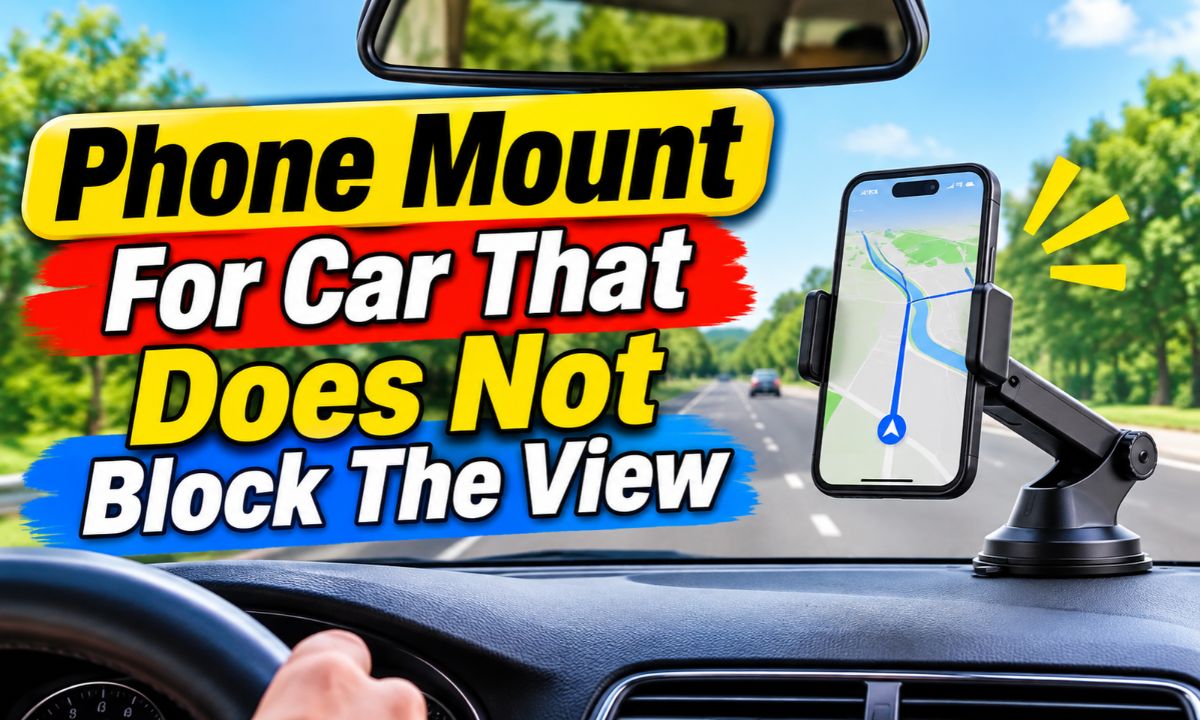
Choose a compact dashboard, center vent, or low-profile mount that keeps your phone easy to glance at without covering the road ahead.
Driving through busy American cities, cruising on interstate highways, or following directions on an unfamiliar suburban road can make a phone mount useful. It keeps your phone in one place and makes navigation easier to check. However, a large phone sitting in the wrong spot can hide part of the road, a traffic light, or another vehicle. That is a problem no driver needs.
A phone mount that does not block the view should sit outside your main forward sightline. A low dashboard position or a suitable center air vent often works well. The best choice depends on your car’s layout, the size of your phone, and the space around your controls. You should also keep airbag areas clear and check the phone placement from your normal driving position.
This guide explains how to choose a suitable mount, where to put it, and how to check the final position. It also covers the trade-offs between dashboard, vent, windshield, and cup holder designs. The goal is simple: keep your phone secure and useful without making it harder to see the road.
What Makes a Car Phone Mount Easy to See Without Blocking the Road?
A suitable car phone mount keeps the phone within a useful glance area while leaving the driver’s main view open. It should not cover the road, nearby traffic, traffic signals, mirrors, or important dashboard displays. It should also stay in place when the car turns, brakes, or travels over rough pavement.
The key idea is to separate screen visibility from road visibility. You want to see navigation information without placing the phone directly in front of the windshield. Think of the phone as a small dashboard tool, not another display that competes with the road.
A good position also lets you reach nearby controls without stretching or leaning. If you need to move your head, twist your body, or reach across the steering wheel to check the phone, the mount is probably in the wrong place.
Clear forward vision
The phone should stay outside the main area you use to watch the road. It must not hide pedestrians, vehicles, traffic lights, or road signs.
Easy screen access
Navigation should be readable with a short glance. Avoid positions that force you to look far down or turn your head.
Stable attachment
The base and phone grip should stay secure on normal roads. A loose phone can fall and create a dangerous distraction.
Safe dashboard clearance
Keep the mount away from airbag covers, warning lights, steering controls, and essential vehicle switches.
Why Phone Size and Mount Height Matter
A large smartphone takes up more space than a small one. A thick protective case can add even more bulk. This means a mount that works with a compact phone may block too much of the view when holding a larger device.
Mount height also changes the result. A phone placed high on the windshield may sit directly in the driver’s view. Moving it lower can help, but only if the screen remains easy to see and does not interfere with the dashboard or controls.
Before buying a holder, check the width and height of your phone with its case attached. Compare those measurements with the holder’s supported size and the available space in your car.
Large phones
Look for a compact cradle or a small magnetic head that does not need bulky side arms.
Small phones
A smaller holder can offer more placement choices, but it still needs a secure grip.
Best Places to Put a Phone Mount Without Blocking Your View
The best mounting location depends on the shape of your dashboard and the position of your driver’s seat. A center vent, a suitable low dashboard area, or a raised cup holder may work better than a windshield mount. Each location has benefits and drawbacks.
Do not choose a position just because it looks neat. Sit in the driver’s seat, adjust it as you normally would, and check the full view through the windshield. The phone should not hide anything you need to see while driving.
Low dashboard area
A suitable flat area can keep the phone below the main windshield view. Check that the mount does not cover controls, vents, displays, or an airbag cover.
Center air vent
A compact vent holder can keep the phone close to the dashboard and outside much of the forward view. Make sure the vent can support the mount.
Raised cup holder
A raised cup holder mount can avoid attaching anything to the windshield or dashboard. Check that the phone is not too low to read safely.
Vehicle-specific mounting point
Some vehicles support dedicated mounting brackets. These can offer a tidy fit when designed for the exact dashboard and model.
Low Dashboard Mounts
A low dashboard mount is a useful option when your car has a suitable flat surface. It can hold the phone below the main windshield area while keeping navigation close to the center of the cabin.
Some mounts use suction cups, while others use adhesive bases or special dashboard pads. Check the surface before installation. Curved, soft, textured, or leather-covered dashboards may not hold every type of base securely.
Keep the mount away from the passenger airbag panel. Never assume that a flat section of dashboard is safe just because it looks like a good place for an accessory. Check the vehicle manual for airbag locations and restrictions.
Best for
Drivers with a suitable flat dashboard area and enough space below the windshield.
Main drawback
Adhesive can leave marks, and a poorly placed mount may hide the infotainment screen or dashboard controls.
Center Air Vent Mounts
A center air vent mount is often a good choice when the dashboard has little free space. It keeps the phone close to the center console and may avoid placing anything on the windshield.
Vent mounts use clips, hooks, or locking grips to attach to the vent. Some hold the phone with side clamps, while magnetic models use a compatible phone or case. The mount must match the vent design. Thin, round, loose, or fragile vent slats may not support every holder.
One drawback is reduced airflow. A phone placed in front of a vent can block some heated or cooled air. Warm air may also affect the phone during long drives, especially when wireless charging adds heat.
Best for
Drivers who want a compact mounting position near the dashboard.
Main drawback
It can reduce airflow and place stress on weak vent slats.
Cup Holder Phone Mounts
A cup holder mount uses an existing holder in the center console. It avoids suction cups and adhesive, which can be helpful when the dashboard has an uneven surface.
Some designs have an adjustable base and a raised arm. This can lift the phone closer to the driver’s normal glance area. However, a low cup holder may place the screen too far below the windshield, making it harder to check without looking down.
Check the position of the gear selector, parking brake, storage area, and cup holders before choosing this style. The phone should not interfere with shifting or other essential controls.
Best for
Cars and trucks with raised cup holders near the dashboard.
Main drawback
It can use a cup holder and may place the phone too low or too close to the gear selector.
Windshield Phone Mounts
Windshield mounts use suction cups to attach a phone holder to glass. They offer flexible positioning, but they also create a direct risk of blocking the driver’s view.
If you choose this style, do not place the phone in the central forward sightline. Check state and local rules before attaching anything to the windshield. Some laws limit the size or location of objects placed on vehicle glass.
A windshield mount should never be treated as safe simply because the suction cup is strong. Secure attachment and clear visibility are two separate requirements.
Best for
Vehicles without a suitable dashboard or vent location, when local rules allow the selected position.
Main drawback
The phone and mounting arm can obstruct the road view, and the suction base may lose grip in heat or on unsuitable glass.
Compare Different Car Phone Mount Types
No single mount works equally well in every car. The best option is the one that fits your cabin, holds your phone securely, and keeps the road view open.
The table below compares common mounting styles by placement, visibility, and practical limits. These are general design considerations, not test results for every product on the market.
Source: stuff.tv
Choose a dashboard mount
Pick this style when you have a suitable flat area below the main windshield sightline.
Choose a vent mount
Pick this style when your vents are sturdy and the holder does not interfere with important controls.
Choose a cup holder mount
Pick this style when the holder can raise the phone to a practical position without blocking the gear selector.
Which Mount Type Should You Choose?
A dashboard mount is a practical starting point for drivers who have enough flat space below the windshield. A vent mount may be better when dashboard surfaces are curved or covered with soft material.
A cup holder mount can be useful in trucks and larger vehicles with raised center consoles. A windshield mount should be considered only after checking the local rules and confirming that the selected position does not obstruct visibility.
If your car has a large factory infotainment screen, avoid a mount that covers its display or blocks nearby buttons. You should not have to choose between seeing navigation and using your vehicle’s normal controls.
For small cars
Look for a compact vent mount or a low-profile dashboard holder that does not crowd the limited cabin space.
For SUVs
Check the height of the dashboard and the location of the passenger airbag before choosing a base.
For pickup trucks
A raised cup holder or a suitable center dashboard position may work well if the phone remains easy to glance at.
For older cars
A vent mount or a compatible CD-slot holder may be worth considering if the dashboard has few flat surfaces.
Low-Profile Mounts Versus Long Adjustable Arms
A low-profile mount keeps the phone close to its base. This can reduce clutter and limit the amount of space the holder occupies. It may also make it easier to keep the device below the main windshield view.
Long adjustable arms offer more freedom to move the phone toward the driver. However, a long arm can create more movement over bumps and may place the screen in a less suitable position. A larger arm can also interfere with nearby controls.
Choose the shortest arm that gives you a useful screen angle. More adjustment is not always better when the goal is a clean and unobstructed dashboard.
Low-profile design
Useful for a tidy cabin and limited mounting space.
Adjustable arm
Useful when the base sits lower or farther from the driver’s normal glance area.
Flexible ball joint
Allows screen angle changes, but it should lock firmly and avoid unwanted movement.
Important Safety Rules Before Installing a Phone Mount
A phone mount should never interfere with a vehicle’s safety systems. A clear windshield is important, but you must also think about airbags, mirrors, controls, and the driver’s normal seating position.
The National Highway Traffic Safety Administration explains that frontal airbags deploy very rapidly. People and objects placed too close to an airbag can be injured when it deploys. This is why you should never attach a phone mount to an airbag cover or place a rigid accessory in a possible deployment path.
The exact airbag locations differ between vehicles. Read the owner’s manual and follow any restrictions for dashboard accessories. If the manual does not make a mounting area clear, ask the vehicle manufacturer or a qualified service professional before installing a permanent bracket.
Source: pixabay.com
Keep the windshield clear
Do not place a phone where it hides the road, pedestrians, traffic lights, mirrors, or important signs.
Avoid airbag zones
Never attach a mount over an airbag cover or where a deploying airbag could strike the phone or holder.
Protect vehicle controls
Keep the phone away from the steering wheel, gear selector, hazard switch, and climate controls.
Check local rules
Windshield and electronic device laws differ across states. Check current requirements where you drive.
Understand Windshield Mounting Laws in the United States
There is no single placement rule that should be assumed to apply in every American state. Some states restrict objects attached to the windshield, while others define permitted areas or exceptions. The exact rule can depend on the location and size of the object.
For example, a position that is allowed in one state may not be permitted in another. Drivers who travel across state lines should check the rules for each state rather than relying on the law where they bought the mount.
The Governors Highway Safety Association provides state-level distracted-driving law information. For a final legal decision, check the current state statute or official state transportation guidance. A general product guide cannot replace the law that applies to your vehicle.
Check the state
Review the windshield obstruction and electronic device rules for your state.
Check the location
Look for restrictions on the driver’s side, center area, or other parts of the windshield.
Check the phone size
A large phone may be treated differently from a small accessory under rules that set size or placement limits.
Why Hands-Free Does Not Mean Distraction-Free
A phone mount can reduce the need to hold a phone, but it does not remove every form of distraction. Looking at a map for too long, changing music, reading messages, or entering an address can still take attention away from driving.
NHTSA defines distracted driving broadly. It includes activities that take your eyes, hands, or attention away from the driving task. Even a hands-free device can demand attention that should remain on the road.
Set your destination before moving. Use voice directions when appropriate, silence unnecessary alerts, and pull over in a safe place if you need to change a route or handle a message.
Before driving
Set navigation, choose your music, and connect charging cables while the vehicle is parked.
While driving
Follow voice directions and avoid typing, scrolling, or browsing.
When a change is needed
Pull over somewhere safe and park before making detailed changes on the phone.
How to Install a Phone Mount Without Blocking Your View
The safest way to install a phone mount is to plan the position before attaching the base. Do not rush to stick a holder onto the first open area you see. A few minutes of checking can help you avoid a poor fit, blocked controls, or a damaged dashboard.
You will need your phone with its normal case, the mount and its supplied parts, a clean cloth, and the vehicle owner’s manual. If the mount requires an adhesive pad or suction base, follow the manufacturer’s preparation and curing instructions.
Source: androidpolice.com
Step 1: Sit in your normal driving position
Adjust the seat, steering wheel, and mirrors before deciding where the phone should go.
Step 2: Check the dashboard
Find a location outside the road view and away from airbags, displays, switches, and controls.
Step 3: Test the phone position
Hold the phone in the proposed location while parked. Check whether it hides any part of your forward view.
Step 4: Prepare the mounting surface
Clean and dry the surface according to the mount instructions. Do not use a cleaner that could damage the dashboard.
Step 5: Attach the base
Install the mount as directed. Avoid forcing vent clips or tightening adjustable parts beyond their intended range.
Step 6: Secure the phone
Place the phone in the holder and check the grip, angle, and clearance.
Step 7: Check everything again
Confirm that the phone does not block the road, mirrors, gauges, controls, or airbag areas.
How to Check Whether the Mount Is in the Right Position
A successful installation should feel natural from the driver’s seat. You should not need to lean forward or turn your head sharply to read a basic navigation instruction.
Look through the windshield as you normally would. Check the view around the hood, both sides of the road, mirrors, and nearby traffic. If the phone covers even a small area that matters to your driving, move it.
Check the dashboard display and all nearby buttons. Make sure the mount does not interfere with the steering wheel, gear selector, or climate system. The phone should also remain secure when you gently check the holder while the vehicle is parked.
Good result
The phone remains outside the main forward view and is held firmly without covering controls.
Poor result
The phone hides a traffic light, requires a large head movement, or blocks an important dashboard display.
Needs adjustment
The screen is difficult to read, the holder moves, or the phone interferes with the vent or console.
What to Do If the Mount Does Not Stay in Place
If a mount slips, do not keep driving and hope it will hold. Park safely and inspect the base, attachment point, and phone grip. A loose holder can drop the phone into an area where it may interfere with the pedals or distract the driver.
For a suction mount, check whether the surface is clean, dry, and suitable for suction. For an adhesive mount, follow the required surface preparation and waiting time. For a vent mount, confirm that the clip matches the vent shape and is not damaging the slats.
If the mount still moves after correct installation, choose another attachment style. Do not add random glue, tape, or extra hardware unless the manufacturer specifically approves it.
Suction cup slips
Clean and dry the approved mounting surface, inspect the suction cup, and reinstall according to the instructions.
Adhesive pad lifts
Check surface compatibility and installation instructions. Replace the pad if the manufacturer offers a suitable replacement.
Vent clip moves
Check the clip design and vent thickness. Stop using it if the vent slat bends or feels loose.
Phone falls from the holder
Check phone size, case thickness, grip adjustment, and magnetic compatibility.
Features to Look for in a Phone Mount That Keeps Your View Clear
A good phone mount does not need dozens of features. Focus on a compact design, secure attachment, suitable adjustment, and compatibility with your phone. These details matter more than decorative lights or extra functions.
A simple holder can work well if it keeps the phone stable and does not occupy valuable dashboard space. Choose features based on your actual vehicle and driving needs.
Source: ikumen.blog
Compact mounting head
A smaller head can reduce visual clutter and leave more room around the dashboard.
Secure phone grip
Clamps or compatible magnets should hold the phone firmly without damaging the case.
Adjustable viewing angle
A locking joint lets you angle the display toward the driver without moving the base into the road view.
Short support arm
A shorter arm can reduce clutter and unwanted movement when the phone is mounted.
Suitable attachment
Choose a base that matches your dashboard surface, vent shape, or cup holder.
Easy phone removal
A simple release mechanism makes it easier to remove the phone while parked.
Magnetic Mounts or Clamp Mounts?
Magnetic mounts use a magnetic connection between the holder and the phone or its case. They can have a small head and a clean appearance. However, your phone or case must support the required magnetic system, or you may need an approved attachment plate.
Clamp mounts hold the phone with adjustable arms or side grips. They can work with many Android and iPhone models, including phones that do not have built-in magnetic mounting support. The trade-off is that the arms can make the holder wider.
Neither design is automatically better for visibility. The mount’s overall size and installed location matter more. A compact clamp can be less obstructive than a large magnetic holder with an extended arm.
Magnetic design
Useful for quick attachment when the phone and case have suitable magnetic compatibility.
Clamp design
Useful for different phone models and cases when the holder supports their dimensions.
Wireless charging
Convenient for compatible devices, but check charging support, heat, cable routing, and power requirements.
Check Compatibility Before Buying
Check the supported phone width and height, including the case. Some holders do not work well with thick protective cases, pop grips, or unusual phone shapes. Magnetic mounts may also require a specific case or metal plate.
For a vent mount, inspect the vent before ordering. A holder designed for straight horizontal slats may not fit a round turbine vent or a vertical vent. A strong clip is not useful if it cannot attach correctly to your vehicle.
If the mount includes wireless charging, check that the phone supports the required charging standard. Also review the manufacturer’s instructions for the power adapter and cable. Charging ability should not come at the cost of poor phone placement.
Phone dimensions
Check supported width, height, thickness, and weight.
Phone case
Confirm that the holder works with your case or magnetic accessory.
Vehicle fit
Check vent shape, dashboard material, and available mounting space.
Charging support
Confirm that the mount and phone support the same charging method.
Common Mistakes That Can Block Your View
Even a well-designed phone mount can become a problem when installed in the wrong place. A holder that looks fine while the car is parked may cover a traffic signal or another important part of the road from the driver’s normal seat position.
Avoid these common mistakes before using your new holder. A small change in location can make the dashboard easier to use and the road easier to see.
Source: ikumen.blog
Mounting too high
A phone near the top of the dashboard or in the center of the windshield may cover important parts of the forward view.
Using a large phone holder
Wide clamps and long arms can create more visual clutter than a compact design.
Ignoring airbag locations
An accessory attached to an airbag cover can become dangerous during deployment.
Blocking a vent
A poorly positioned holder may reduce airflow or prevent you from adjusting the vent.
Choosing a low cup holder without testing
A phone that sits too low can encourage long downward glances.
Ignoring local laws
A windshield position may violate local restrictions even when the mount itself is securely attached.
Do Not Place a Phone Directly Behind the Steering Wheel
The space behind or above the steering wheel may look convenient, but it can hide the instrument cluster. It may also interfere with steering movement or cover warning lights.
The steering wheel also contains the driver’s frontal airbag in many vehicles. Never attach an accessory to the steering wheel or place a rigid phone holder in a location that could interfere with airbag deployment.
Better option
Consider a suitable center vent or low dashboard position that leaves the instrument panel fully visible.
Do Not Place the Mount Over the Passenger Airbag
The passenger-side dashboard is not a safe place for a phone mount simply because it has a large flat area. Frontal passenger airbags often deploy from the dashboard, and an attached object may interfere with deployment.
Check the vehicle manual before placing any accessory on the passenger dashboard. If you cannot confirm that a location is safe, choose another approved mounting point.
Safer approach
Use an approved mounting location that stays outside the airbag deployment path.
Research Findings and Useful Questions to Consider Next
A review of car phone mount guides and official safety information on November 22, 2026, shows that the most useful buying advice is not simply to choose a strong holder. Placement, phone size, vehicle design, and local rules all affect whether a mount is suitable.
The reviewed Car and Driver guide compares tested dashboard, windshield, vent, and cup holder products. It discusses grip, mounting strength, adjustability, airflow, and phone compatibility. Its useful contribution is the comparison of real mounting styles, although product performance in one test vehicle cannot establish fit in every car.
WIRED’s 2026 guide also discusses hands-on testing and the risk of bulky mounts blocking visibility. Travel + Leisure provides further product comparisons, including dashboard and vent options. The practical improvement in this guide is the step-by-step placement check, the distinction between a secure attachment and a clear sightline, and the reminder to verify airbag and local legal restrictions.
The official NHTSA material establishes that distracted driving includes more than handheld phone use. The GHSA state-law resource also shows why drivers should check the rules that apply to their own state instead of assuming one national windshield or phone-use rule.
Source: stuff.tv
DOCUMENTED
NHTSA explains the dangers of distracted driving and the rapid deployment of airbags. GHSA provides state-level information about distracted-driving laws.
REPORTED BY OTHERS
Car and Driver, WIRED, and Travel + Leisure publish product comparisons and testing observations. Their findings apply to the models and conditions they reviewed.
ANALYSIS
A compact mount in a suitable low dashboard or center vent position can offer a useful balance between access and visibility, depending on the vehicle.
NOT ESTABLISHED
No single mount type or placement has been established as the safest choice for every car, phone, driver, and road condition.
Next-Question Gap Map
The following questions are inferred next needs based on the installation and buying task. They are not presented as verified search-volume findings or observed search queries. Competitor coverage refers only to the pages reviewed for this guide.
Will a vent mount damage my car’s vents?
Reader stage: Before buying. Basis: Inferred next need. Competitor coverage: ANSWERED by Car and Driver, which discusses fitting and installation. Reader benefit: Check vent strength and clip compatibility before installation. Evidence: Manufacturer instructions and vehicle design. Priority: High. Placement: Mount comparison section.
Can a windshield phone mount be legal in every state?
Reader stage: Before buying. Basis: Inferred next need. Competitor coverage: SHALLOW in the reviewed product guides. Reader benefit: Avoid relying on a general placement recommendation. Evidence: State statutes and official state guidance. Priority: High. Placement: Safety and legal section.
Will a phone mount fit with a thick protective case?
Reader stage: Before buying. Basis: Inferred next need. Competitor coverage: ANSWERED in part by Car and Driver and WIRED. Reader benefit: Prevent an incompatible purchase. Evidence: Exact product dimensions and manufacturer compatibility details. Priority: Medium. Placement: Compatibility section.
How can I stop a phone mount from falling?
Reader stage: During installation. Basis: Inferred next need. Competitor coverage: ANSWERED by Car and Driver for suction and installation issues. Reader benefit: Identify the cause instead of adding unsafe adhesive or tape. Evidence: Mount instructions and attachment design. Priority: High. Placement: Installation troubleshooting section.
Can wireless charging make a phone too hot?
Reader stage: After buying. Basis: Inferred next need. Competitor coverage: SHALLOW across the reviewed general mount guides. Reader benefit: Understand charging and heat trade-offs. Evidence: Phone and charger manufacturer guidance. Priority: Medium. Placement: Compatibility section.
Frequently Asked Questions
Q
Where should I put my phone mount so it does not block my view?
A suitable low dashboard area or center air vent is often a practical starting point. Choose a position outside your main forward sightline and away from airbags, mirrors, gauges, and controls.
Check the position from your normal driving seat before attaching the mount. If the phone hides any important part of the road, move it.
Q
Are dashboard phone mounts better than windshield mounts?
A dashboard mount can be a better choice when your vehicle has a suitable mounting surface below the windshield. It can keep the glass clear and reduce the chance of placing a phone directly in the forward view.
However, dashboard mounts can leave adhesive marks or interfere with controls if placed poorly. Windshield mounts offer flexible positioning but require careful attention to visibility and state laws.
Q
Can I use a phone mount on my car’s air vent?
Yes, if the vent design supports the mounting clip and the holder does not damage the slats. Check whether the mount fits horizontal, vertical, or round vents before buying.
Remember that a vent mount can reduce airflow. Avoid forcing a clip onto a weak or fragile vent.
Q
Are suction cup phone mounts safe for dashboards?
They can work well on compatible, clean, and smooth surfaces. However, not every dashboard material or shape supports a suction cup. Some holders require an approved mounting pad.
Follow the manufacturer’s instructions and avoid placing the base over airbag covers. Check the attachment regularly, especially if the cabin becomes very hot.
Q
Can I mount my phone near the rearview mirror?
A position near the rearview mirror may obstruct your forward view or interfere with the mirror’s use. It may also violate local windshield placement rules.
Avoid placing the phone in the mirror’s viewing area or directly in front of the driver. A suitable dashboard or vent location is often a better alternative.
Q
What type of phone mount is best for a small car?
A compact vent mount or low-profile dashboard mount may work well in a small car because both can take up less space than a large adjustable holder.
The final choice depends on vent strength, dashboard shape, phone dimensions, and control placement. Test the position before installing it.
Q
Does a magnetic car phone mount work with Android phones?
Yes, many magnetic mounts can work with Android phones when the device or case supports the required magnetic connection. Some holders use an adhesive metal plate or a compatible magnetic case.
Check the mount manufacturer’s compatibility instructions. Do not assume that every Android phone has built-in support for every magnetic mounting system.
Q
Can a phone mount block an airbag?
A phone mount can interfere with an airbag if it is installed over an airbag cover or in its deployment path. A phone or rigid mounting arm may also become a hazard when the airbag deploys.
Check the vehicle owner’s manual for airbag locations and accessory restrictions. Never attach a holder to an airbag cover.
Q
Should I use a phone mount while driving?
A properly installed mount can keep the phone in a fixed location for navigation, but it does not make every type of phone use safe or legal. Texting, scrolling, and frequent screen adjustments can still distract you.
Set your route before driving and use voice directions when suitable. Pull over and park safely before handling tasks that need your attention.
Q
How do I know if my phone mount is too low?
A mount may be too low if you need to look far down, lean forward, or turn your head to read navigation. These movements can take your attention away from the road.
Try a suitable raised vent or dashboard position instead. The phone should remain outside your forward sightline while requiring only a brief glance.
✦ Wrapping Up
Conclusion
Finding a phone mount that does not block the view starts with choosing the right location. A compact low dashboard holder or a suitable center vent mount can offer a useful balance between phone access and clear road visibility. A raised cup holder can also work when it keeps the phone at a practical height without blocking controls.
Do not choose a mount based on appearance alone. Check phone compatibility, dashboard material, vent strength, attachment quality, and adjustment range. Most importantly, keep the holder away from airbag deployment zones and check local windshield restrictions before installation.
Take time to test the position while parked. Look through the windshield, check your mirrors and gauges, and make sure the phone does not interfere with normal vehicle controls. If the mount hides part of the road or requires long glances, choose another location.
💡 Key Takeaway
Before buying, measure your phone with its case, inspect your dashboard and vents, and identify a mounting point outside your main road view and all airbag zones. Install the holder while parked, then check visibility and stability from your normal driving position.